Starlight AI: hands-free voice AI for maintenance.
Starlight combines voice, retrieval and live asset context so a technician can ask, understand and act without leaving the machine.
- Typed tools
- 65
- Voice response
- 165 ms
- Time to integrate
- 1 day
A technician's hands are already full.
Gloves on. Both hands on the job. Plant noise. A phone is the wrong instrument, and the terminal is fifty metres away.
Gloves and PPE
Touchscreens do not work through them.
Both hands busy
On a ladder or inside a panel there is no spare hand.
Noise and distance
Questions still get shouted across a plant floor.
The interface is on your face.
Consumer hardware: nothing bespoke to buy, certify or support. Pair once and Starlight is one sentence away.
- 01
Pair
Bluetooth once. Reconnects to MAAPS Mobile on its own.
- 02
Ask
“Hey MAAPS” opens a live voice session with Starlight AI.
- 03
Look
The camera reads the asset tag or QR code when needed.
- 04
Act
The answer is spoken back, with the next step offered.
Not a chatbot. An agent inside MAAPS.
Starlight resolves who is asking and which asset, then calls MAAPS directly through typed tools, so every answer is grounded in your live data.
- 01Hears
Speech arrives from the glasses or the app, live.
- 02Understands
Resolves who is asking, which asset, what they need.
- 03Retrieves
Calls MAAPS directly through typed tools.
- 04Answers
Spoken back in about a second, next action offered.
- Heard“Why is Pump P-104 alarming?”
- Resolvedasset Pump P-104 · technician on site
- Toollive alarms for P-104
- Toolsensor history · last 24 h
- Toolopen work orders
- SpokeBearing temp over threshold — raise a work order?
Latency is the product.
Measured on the production box on real sentences from our own agent. Starlight's voice runs on ElevenLabs Flash.
Quality that survives a plant floor
Clear consonants matter next to running machinery.
Turn-taking, not push-to-talk
A conversational STT model decides when the technician has finished.
Built on ElevenLabs
Starlight's voice layer runs on ElevenLabs, backed by a platform grant as we scale.
Ask your glasses.
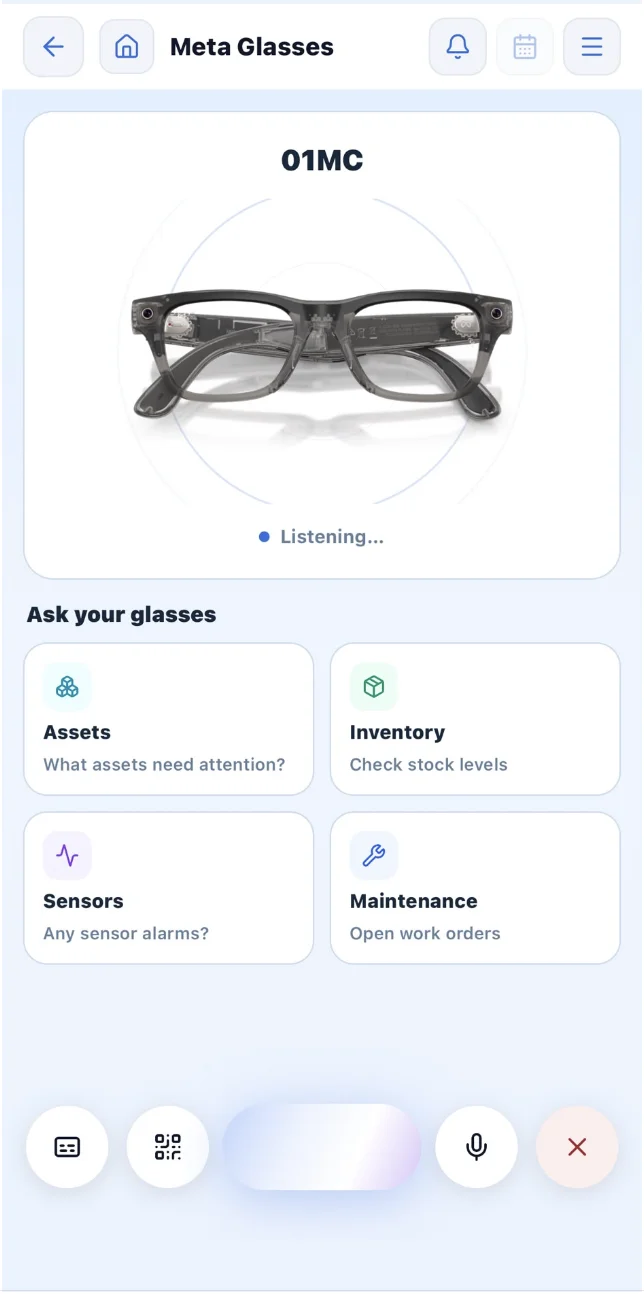
The Starlight screen in MAAPS Mobile shows your glasses connected and listening, with one-tap shortcuts for the questions technicians ask most.
- ✓Ask about the asset, procedure or fault
- ✓Retrieve manuals, SOPs and history
- ✓Explain a live alarm and its thresholds
- ✓Look up parts, stock and open orders
- ✓Raise and update work from the floor
The same alarm, connected.
Each function receives what the last one learned, and the finished work returns to the asset.
- 01Condition monitoring
Drive-end vibration 4.2 mm/s · Major
- 02Alarm
Asset identified · Pump 11, Pump Station 1
- 03Asset history
Service history and documents attached
- 04Maintenance
Request prepared for review
- 05Supply chain
Part and linked supplier identified
- 06Completion
Notes returned to asset history
Illustrative scenario · demonstration data. Example voice requests: “What’s the status of this asset?” · “Any open maintenance on it?” · “Start a maintenance report.” · “Call the supplier for this part.”
People approve what happens.
Starlight gathers the context and prepares the work. A person confirms before anything changes in MAAPS.
From the PLC to the technician's ear.
Data stays attached to the asset it came from, not parked in a separate dashboard.
Siemens S7-1500 · SCADA · IO-Link
MAAPS Edge · collect and buffer
MQTT over TLS 8883 · HTTPS / APIs
Live data, alarms, history, assets and work orders
Technician access, alerts and field workflows
 ElevenLabsVoice AI
 Microsoft AzureCloud hosting
 MongoDBData
 DeacamDelivery partner
 FermecraftDelivery partner
Questions, answered.
What hardware does Starlight need?
MAAPS Mobile plus Meta AI glasses paired over Bluetooth. Starlight also works directly in the MAAPS Mobile app with one-tap shortcuts for the most common questions.
Does Starlight act on its own?
No. Starlight gathers the context and prepares the work — a person confirms before anything changes in MAAPS. Tool access is scoped, tenants are isolated, and every action is auditable.
How fast is the voice response?
About 165 ms to the first spoken word on ElevenLabs Flash, measured on our production setup with real sentences from our own agent.
Does it know my plant or just the web?
Your plant. Starlight resolves who is asking and which asset, then calls MAAPS directly through typed tools, so every answer is grounded in your live alarms, history, documents and stock.
See Starlight AI on your site.
Book a demo and we'll show you the glasses, the voice and your own assets working together.